https://newvhd.com/static/linux-jiaoxue-ruanjian.html?lang=en
Domestic Xinchuang · Linux teaching software

Linux teaching software
cc-class Xinchuang Classroom Teaching and Computer Lab Management

A single set covering before, during, and after class Linux teaching software — cc-class runs natively on UOS / Kylin / Ubuntu, covering the full workflow from screen broadcast, interactive Q&A, and courseware push to online exams, homework collection/distribution, attendance check-in, and classroom management. Teachers and students share one installer, with roles automatically identified by computer name, making teaching management in Xinchuang computer labs as effortless as in Windows labs.

One Linux teaching software suite that runs through the entire class

More than screen broadcasting: it builds every step of a lesson — from preparation and teaching to wrap-up — into one piece of software

Before Class

Lesson prep and environment setup

The courseware library manages frequently used courseware; pick a teaching channel to start class, and student machines fall into place automatically with the cloud desktop image.

Courseware LibraryTeaching channelDelivered with the image
During Class

Interactive teaching and control

Screen broadcasting + voice, courseware push, buzz-in quizzing, random roll-call, plus blackout and internet lockdown to keep order.

Screen BroadcastBuzz-in and votingClassroom Control
In-Class Assessment

Online exams and check-in

Import a question bank to distribute exams, with countdown auto-submission and scoring; start check-in to record the attendance list automatically.

Online examsAuto Collect SubmissionsCheck-In & Attendance
After Class

Homework collection and statistics

Collect assignments, reports and exam files in one click, archived by class / student ID; export classroom data reports with a single click.

Assignment CollectionArchiveData Reports

The teacher's "teaching console" on the Linux desktop

The image below shows the cc-class teacher toolbar, with teaching demonstration, classroom interaction, remote commands, exams, and file distribution lined up in a row—one click applies them to every student machine in the class.

Turn every action of the whole lesson into a single row of buttons

The cc-class teacher-side top toolbar consolidates core teaching actions in one place: screen broadcast, student presentation, video live stream, network cinema, random roll call, interaction, remote command, exam, file distribution, and assignment collection — acting on all students by default, with right-click access for individual student operations.

  • Runs natively on LinuxXinchuangRuns directly on the UOS / Kylin / Ubuntu desktop, with features and interface identical to the Windows version.
  • Push coursewareSelect a PPT / PDF / image / MP4 and push it to all student machines in one click, opening automatically
  • Classroom InteractionClass quizzes, polls, peer review, and reward leaderboards keep the class lively
  • Remote CommandsStart programs, open web pages, close processes, and power machines on/off remotely on student devices.
  • AI AssistantSmart question generation and subjective-answer grading ease the burden of lesson prep and marking
  • Desktop RecordingRecord the teacher's screen to a file in one click to build up micro-lesson resources
Linux teaching software cc-class teacher-end teaching toolbar
cc-class Teacher Client · Teaching Toolbar
Real interface of Linux teaching software

The actual interface of cc-class for teaching, attendance and control under Linux / Xinchuang environments

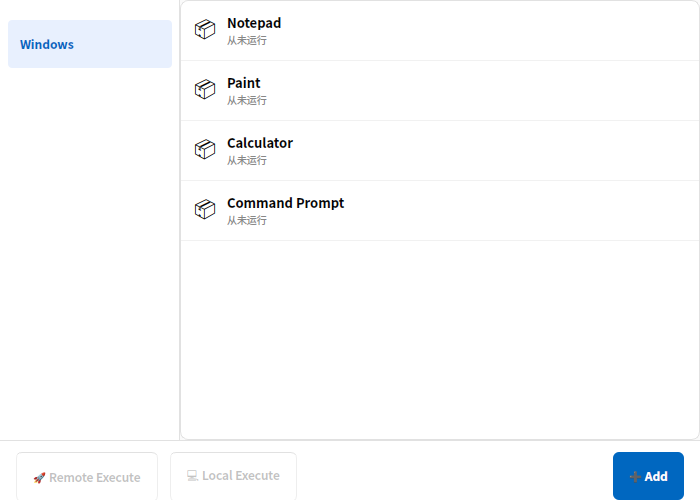
cc-class Launch applications via remote command
Remote CommandsLaunch a designated program, open a web page or end a process on all student machines.
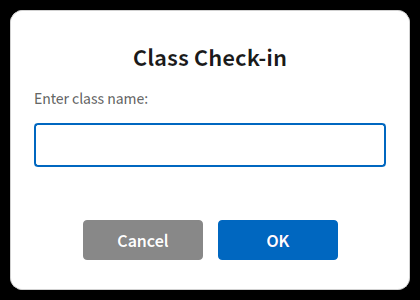
cc-class Start sign-in by entering the class name
Check-In & AttendanceStart check-in with one click; students enter their name and ID, automatically compiled into a roster.
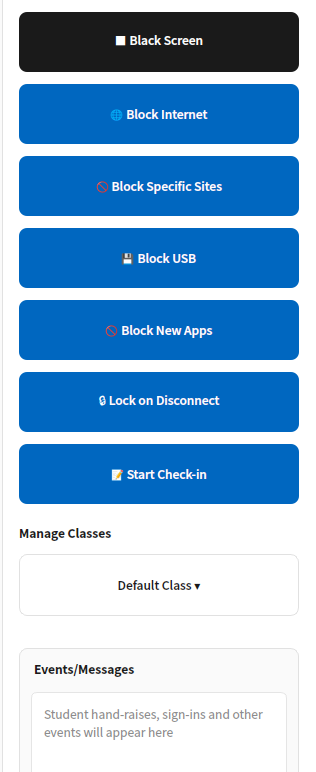
cc-class classroom management panel
Classroom ControlBlack screen, internet block, USB block, lock-on-disconnect — manage discipline with a single row of switches.

Full overview of interactive teaching features

Teaching, learning, practice, testing, assessment and management — all covered by one suite of Linux teaching software

Screen broadcasting / presentation

Project the teacher's screen, students' screens, live video and the network cinema to the whole class in multiple presentation modes.

Classroom buzz-in / polling

A quick-answer button shows who pressed first; single- and multiple-choice voting displays tallies in real time, enlivening the classroom.

Random Roll Call

Randomly pick a student with a scrolling animation, and demonstrate their screen to the whole class in one click.

Push courseware

Push PPT / PDF / images / video to all student machines in one click, opening automatically.

Online exams

Import a CSV question bank to distribute exams, with five question types and countdown auto-submission, scoring and export.

Assignment Distribution & Collection

Distribute materials with one click and collect homework automatically — archived by class / student ID with resumable transfer.

Check-In & Attendance

Starting check-in automatically collects name, student ID and class, with a live list that can be exported to Excel.

Remote commands / power

Remotely launch programs, open web pages and end processes; remotely shut down, restart and Wake-on-LAN.

Discussion / Messages

Medical cloud-desktop solution — vDisk smart-hospital desktop management —

AI Assistant

Smart question generation and grading of open-ended answers to support lesson prep and marking, boosting teaching efficiency.

Classroom Control

Blackout for silence, internet ban, website blocking, USB disabling, network-cut screen lock, and prevention of launching new apps.

Classroom data reports

Track classroom data such as hand-raising, quick answers, voting and chat, with a reward leaderboard to motivate students.

Why choose cc-class as your Linux teaching software

Native Xinchuang, unified installation and cloud-desktop linkage — making Xinchuang lab teaching easy to deploy.

Native Xinchuang adaptation

amd64 + arm64 .deb, with native coverage for Phytium / Kunpeng / Loongson, and out-of-the-box support for UOS / Kylin.

One installer shared by teacher and student clients

Automatically identify teacher / student machines by computer name, with no need to build separate images, halving deployment and maintenance effort.

Integrated with the vDisk cloud desktop

Ready to use as soon as the cloud-desktop image is distributed; distribution tags automatically identify teacher and student ends — out of the box.

Multilingual interface

Automatically switches among Chinese / English / Japanese / Korean following the system language, with button positions kept identical.

Stable and Reliable

Auto-reconnect on disconnection, recovery of class and session state after a crash, and systemd daemon for auto-start on boot.

Localized technical support

The original technical team provides deployment, training and operations support, ensuring the successful rollout of Xinchuang projects.

Learn More

Linux teaching software products and solutions

Success Stories

Real Deployment Site Snapshots

To protect client privacy, case images do not display client names

Give your Xinchuang computer lab a Linux teaching software that's genuinely easy to use

cc-class Xinchuang teaching software, natively built around Linux, covers the full workflow before, during, and after class—request a trial and experience the hassle-free deployment where teacher and student endpoints share a single installation package.