Shanghai Chengcheng Information Technology Co., Ltd. · The team has been established for 20 years, dedicated to R&D.
Cloud Desktop Application Solutions

Cloud Desktop Application Solutions
One platform covering multi-industry scenarios

The Chengcheng vDisk converged cloud management platform is built on the IDV architecture, with desktops running locally on endpoints, delivering performance equivalent to physical machines and remaining usable even without a network. Combined with unified image management, 30-second restore, schedule integration, cc-class interactive teaching, and IoT centralized control, it can flexibly adapt to various scenarios such as education, healthcare, call centers, training, and production lines, allowing phased deployment based on needs.

Foundation capabilities: one platform, composed on demand

IDV5 cloud desktop core engine — centralized control, local execution, performance on par with a physical machine

One-image unified management + elastic caching + rapid restore

Images are distributed centrally from the backend while desktops run locally, with on-demand caching across network, half-cache, and full-cache modes; a single master-disk image manages heterogeneous terminals, a one-click push takes effect instantly, every restart returns to a clean state, and it works normally even when offline.

  • Network / Semi-cached / Fully cachedMulti-ModeDiskless network boot is instantly usable, half-cache reads on demand, and full-cache works offline—even old machines with small disks can run it
  • One Image for All Heterogeneous EndpointsOne image is compatible with multiple brands and models, with BIOS/UEFI dual boot and one-click push.
  • Resumable transfer / BT distributionUse while downloading and seed-share between peers, so the more endpoints in a batch the faster it goes, with zero server load
  • System restore in 30 secondsClean on reboot: misoperations, viruses, or config changes won't affect the next session
  • Personal Cloud Drive in the Teaching SpaceEquivalent to a local system disk, with data roaming across endpoints and load balancing across multiple servers.
  • Full-stack Linux supportx86 and ARM64 plus Linux, with driver builds
Real Deployment Use Cases

Linux cloud desktop in real use

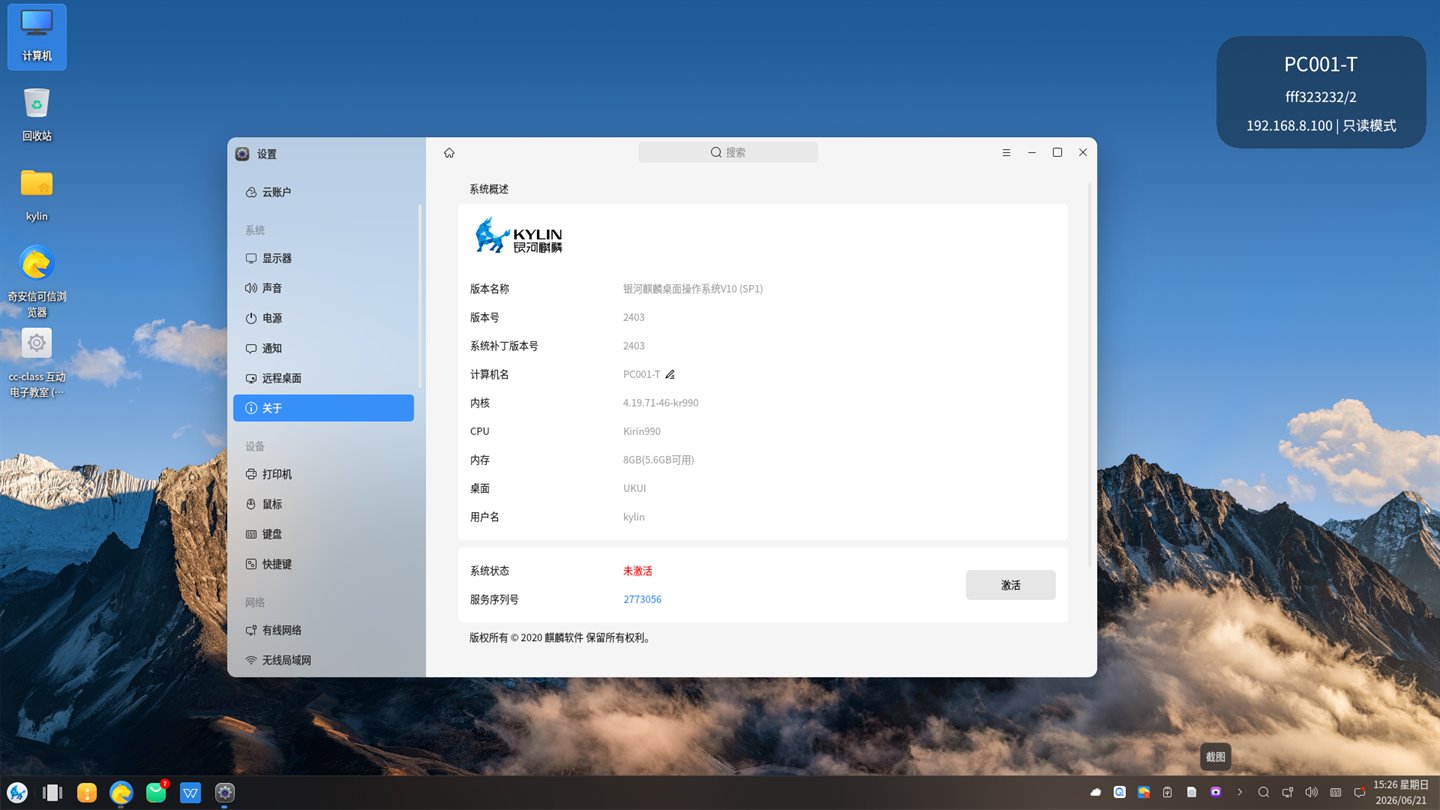
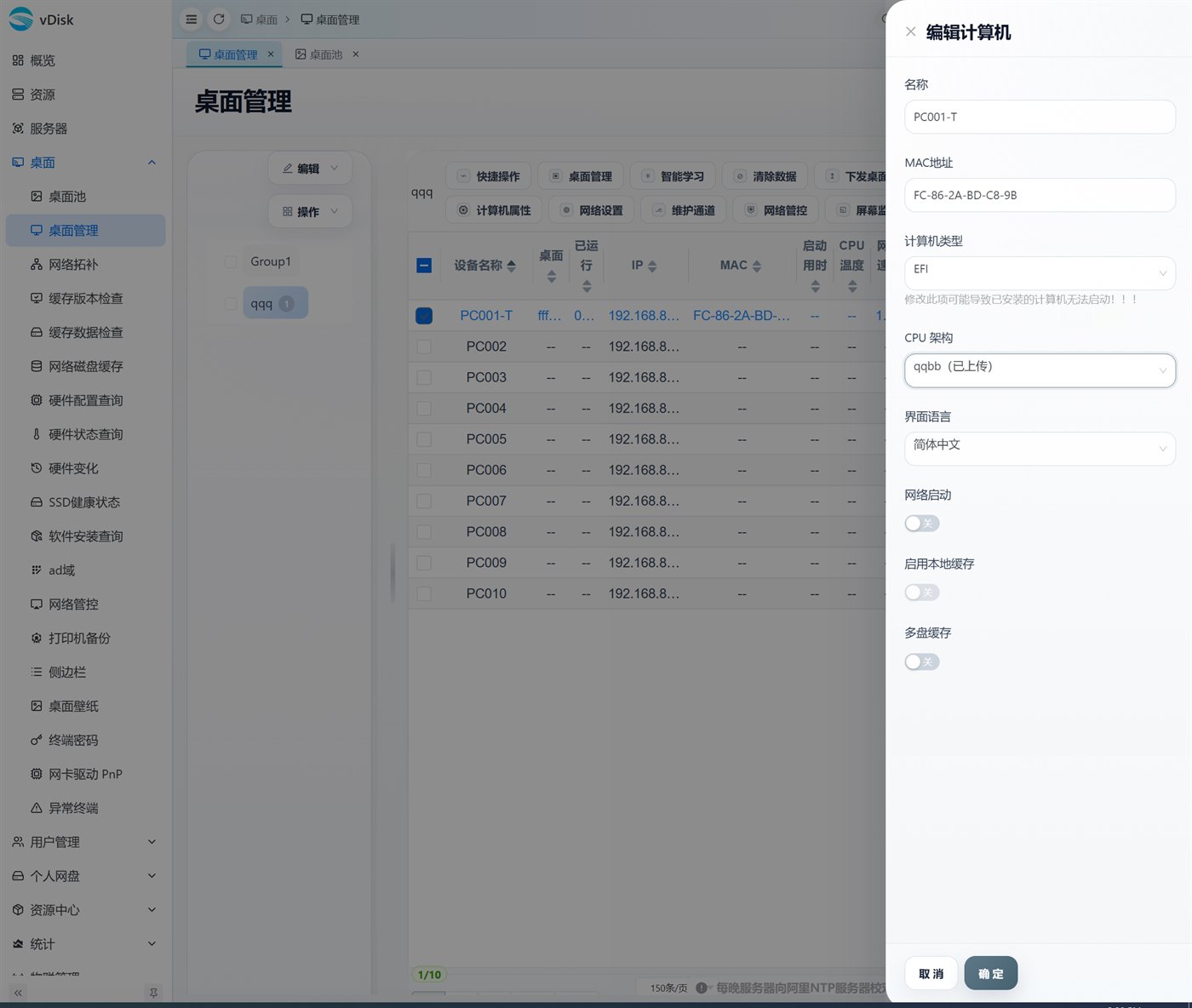
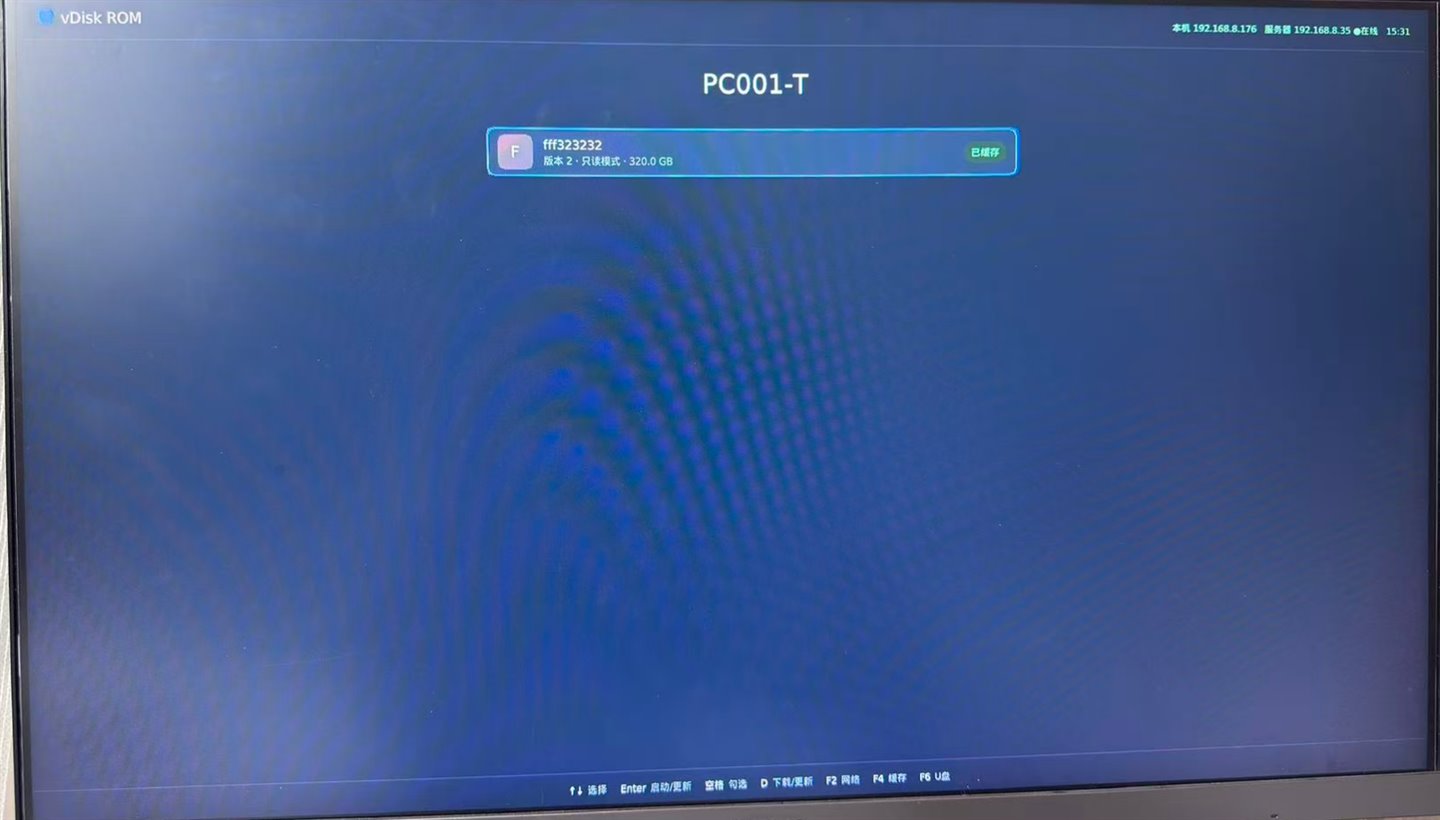
vDisk delivers Linux desktops to Linux terminals from the same platform: graphical ROM boot, the Linux desktop running locally, and the web console setting the CPU architecture per terminal, with x86 and ARM64 managed side by side.

vDisk's graphical boot ROM shows the desktop menu and NIC / server status right at power-on; with EFI boot and read-only startup, Linux terminals join the cloud desktop as soon as they boot.
Graphical boot ROMvDisk's graphical boot ROM shows the desktop menu and NIC / server status right at power-on; with EFI boot and read-only startup, Linux terminals join the cloud desktop as soon as they boot.
A Linux desktop delivered by vDisk, on a 4.19 kernel with an ARM processor, that feels the same as a local install.
Linux cloud desktopA Linux desktop delivered by vDisk, on a 4.19 kernel with an ARM processor, that feels the same as a local install.
The web console sets each machine's CPU architecture (for uploaded images), EFI / BIOS boot type, interface language, network boot, and multi-disk cache, and x86 and ARM64 terminals are managed in the same console.
Cross-architecture unified managementThe web console sets each machine's CPU architecture (for uploaded images), EFI / BIOS boot type, interface language, network boot, and multi-disk cache, and x86 and ARM64 terminals are managed in the same console.

Industry-Specific Cloud Desktop Application Solutions

One platform, different focuses — click to explore the detailed solution for each industry

Education

University computer rooms / Smart classrooms

A single image centrally manages multiple campuses, with timetable-linked unattended operation, and cc-class interactive teaching delivered together with the image.

Timetable LinkageUnified Image Management30-Second Restore
Healthcare

Hospital / Medical technology workstations

Unified HIS/PACS environments, tiered permissions with audit traceability, and centralized cross-campus O&M keep data off the endpoints.

Permission AuditingNo Local Data StorageCross-Site
Call Center

Agent desktops / elastic scaling

Unified seat images, minute-level scaling, second-level fault recovery, shift switching, and centralized O&M.

Elastic ScalingSecond-Level RecoveryShift Switching
Training / Production line

Training Lab / Industrial Endpoint

Training environments switch by course with one-click restore; production-line terminals are standardized, centrally managed and run stably.

Environment SwitchingStandardizationCentralized Management

No matter the industry, you get these benefits

Stable, labor-saving, secure, scalable

No Compromise on Performance

Runs locally with performance equal to a physical PC, so professional software runs smoothly and works offline.

Heterogeneous Endpoint Reuse

One image works across multiple brands and batches; old, small drives keep working, saving on retrofit budget.

Major Staffing Savings

Timetable/scheduled-task automation plus mobile operations significantly cut the manpower needed for O&M.

Secure and Controllable

Centralized data that never resides locally, tiered network control and logged operations ensure compliance.

Linux support

Full-stack support for ARM64 and x86 CPUs and Linux.

Easily Scalable

Built on the cloud desktop as a foundation, add e-classroom, IoT control, and AI teaching as needed.

A phased implementation roadmap

Deploy the most beneficial parts first, then expand at your business pace

STEP 01

Current State Assessment

Review endpoints, network, software versions and organizational permissions to establish a baseline of the live network.

STEP 02

Pilot Validation

Build the master image and policies on a small scale to validate compatibility, stability and restoration results.

STEP 03

Phased Rollout

Migrate in phases by region/department, keeping a parallel window for a smooth transition.

STEP 04

Continuous Optimization

Run large-screen monitoring and weekly/monthly reviews to continuously optimize templates, tasks and permissions.

Related products and solutions

Combine them into the overall solution that fits you best

Products

vDisk Cloud Desktop Platform

An integrated platform unifying cloud desktops, IoT control, timetable integration, and Mini Program management.

Products

cc-class Interactive Digital Classroom

Teacher and student endpoints share one image, delivered via cloud desktop—interactive teaching done in one place.

Solutions

Comprehensive Solution

Cloud desktop + e-classroom + IoT control unified in one integrated build.

Solutions

Lab platform application solution

Deploy professional lab environments from a single image, with lab data roaming via personal network drives.

Apply cloud desktops to your business scenarios

Request a trial and get a one-on-one application plan tailored to your industry and endpoint scale.

Page update date: 2026-06-30